Using Aspire and YARP with SSR web apps
I find it increasingly common that JavaScript based SPAs (single page applications) or even SSR (server-side rendered) applications are used as frontends for .NET backends written in ASP.NET Core Web API. In large teams, the two applications are usually developed independently by separate teams, but in smaller teams and solo projects it's not unusual to have both applications running locally at the same time during development.
Up until .NET 7, the NET SDK included templates for ASP.NET Core with a SPA frontend which took care of starting both projects and proxying requests to the SPA project so that both applications were available on the same port. I even blogged about developing such a project inside a dev container. Since .NET 8, that's not the case anymore. If you're using Visual Studio, it ships with its own templates for a similar setup. But you're on your own if you're not on Windows or just using a different IDE.
Of course, you could always start both projects manually and have them listen on separate ports. In the case of Nuxt:
pnpm dev -o
dotnet run
Or you could use Aspire, an agent-ready, code-first tool for composing, debugging, and deploying distributed applications.
You'd start by adding an Aspire AppHost project to your solution with the following command (or its equivalent in your IDE of choice):
dotnet new aspire-apphost
To start the Web API project from Aspire, reference it and rebuild the solution to generate the helper classes. Then, the following block of code will integrate the project and expose the HTTP endpoints through Aspire:
var api = builder
    .AddProject<Projects.Api>("api")
    .WithExternalHttpEndpoints();
For the Nuxt project, you'll first have to reference the Aspire.Hosting.JavaScript NuGet package. Then you can add the following code:
var nuxt = builder
    .AddViteApp("web", "../../nuxt")
    .WithPnpm()
    .PublishAsPackageScript()
    .WithExternalHttpEndpoints();
Make sure to replace ../../nuxt with the correct relative path to your Nuxt project. You can skip WithPnpm(), if your using npm instead of pnpm.
PublishAsPackageScript() is needed to provide Nuxt with node_modules at runtime. In the current version of Aspire (13.6.4) you'll get an error if you do that:
ASPIREJAVASCRIPT001:
Aspire.Hosting.JavaScriptHostingExtensions.PublishAsPackageScript<TResource>(this IResourceBuilder<TResource>, string, string?)is for evaluation purposes only and is subject to change or removal in future updates. Suppress this diagnostic to proceed.
To resolve it and build the project, you'll have to wrap the code block with a pragma directive:
#pragma warning disable ASPIREJAVASCRIPT001
// ...
#pragma warning restore ASPIREJAVASCRIPT001
Now you're ready to run your Aspire AppHost project
dotnet run
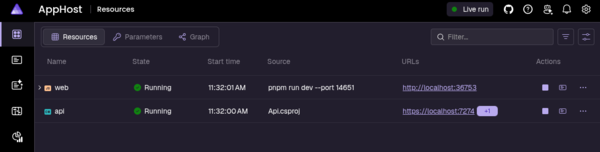
It will build and start both of your projects for you. And as an added bonus provide you with a dashboard for monitoring the apps during development:
If you're using pnpm, the Nuxt project might fail to run with the following error:
Error: ERR_PNPM_IGNORED_BUILDS

× installing dependencies
╰─▶ Ignored build scripts: esbuild@0.28.2

help: Run "pnpm approve-builds" to pick which dependencies should be allowed
to run scripts.
This should only happen if you didn't approve the esbuild build script during the initial Nuxt project setup (or at some later time). As instructed by the error message, you can still do it now with the following command:
pnpm approve-builds
Once you interactively approve the build script, you'll end up with a pnpm-workspace.yaml file with the following contents
allowBuilds:
  esbuild: true
The Aspire AppHost should now succeed in starting the Nuxt project as well.
At this point, each project will still only be accessible on its own port. You can change that with YARP.
Start by referencing the Aspire.Hosting.Yarp NuGet package from your AppHost project. Then configure it with the following block of code:
builder
    .AddYarp("gateway")
    .WithConfiguration(yarp =>
    {
        yarp.AddRoute(nuxt);
        yarp
            .AddRoute("/api/{**catch-all}", api)
            .WithTransformPathRemovePrefix("/api");
    });
This preserves the Nuxt routes and prefixes the Web API routes with /api. It allows you to access both projects via the YARP port. However, you're likely to get the following error from Nuxt when you try it:
Blocked request. This host ("aspire.dev.internal") is not allowed. To allow this host, add "aspire.dev.internal" to
server.allowedHostsin vite.config.js.
To do that, modify your nuxt.config.ts file by adding the following Vite configuration as instructed:
export default defineNuxtConfig({
  // ...
  vite: {
    server: {
      allowedHosts: ["aspire.dev.internal"],
    },
  },
});
You can find a working sample project in my GitHub repository. Check individual commits to see what changes were required for each step: to introduce Aspire and to add YARP to it.
Aspire is primarily promoted as a development orchestrator for microservice-based application, but it also works well with simpler architectures. It can make sense to use it as soon as your application consists of at least two independent services.
