Git repository on a network share
I recently played around with having some version-controlled files on a remote Linux server with SSH access. I still wanted to edit them locally in Visual Studio Code, so the Remote - SSH extension seemed a perfect fit. Unfortunately, connecting to the server from Visual Studio Code failed with the following error:
The remote host may not meet VS Code Server's prerequisites for glibc and libstdc++ (The remote host does not meet the prerequisites for running VS Code Server)
The server did not meet the prerequisites, so I had to start looking for other solutions.
I decided to share the directory with the files I wanted to edit on the server so that I could access them from my computer. Using this approach, I managed to initialize a Git repository, but as soon as I wanted to perform any Git operation inside it, it failed with the following error:
fatal: detected dubious ownership in repository at '//my-server/my-share/my-dir'
'//my-server/my-share/my-dir' is owned by:
    (inconvertible) (S-1-5-21-577097838-3836064388-3576385918-3054)
but the current user is:
    MyWinPC/damir (S-1-5-21-804102101-2538954194-3365188178-1001)
To add an exception for this directory, call:

    git config --global --add safe.directory '%(prefix)///my-server/my-share/my-dir'
It was because of a security measure, introduced in Git 2.35.2. Changing the ownership of the files on the share wasn't an option, so I executed the command suggested in the error message to bypass the check for that specific directory:
git config --global --add safe.directory '%(prefix)///my-server/my-share/my-dir'
This has indeed resolved the issue, so that I could perform all Git operations as usual, both form command line and from GUI clients.
Before proceeding, I wanted to make sure that all the files would have Linux line endings although I would be editing them from Windows. In Visual Studio Code you can use the Change End of Line Sequence command to select the line endings for each file:
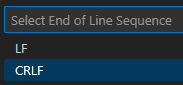
This works great for existing files, but there's always a risk of forgetting to switch the line endings when creating a new file. To avoid this, it's best to set the default value in workspace settings:
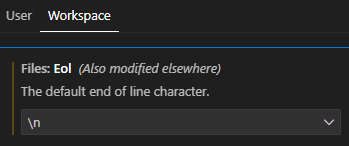 This setting will be persisted in
 .vscode/settings.json file, which can also be added to the git repository:
{
  "files.eol": "\n"
}
Git has its own approach to handling end of line differences between Windows and Linux in files committed to a Git repository. If you're working in Windows, you most likely have it enabled globally with the core.autocrlf setting set to true. In this particular scenario, this setting would interfere with using Linux line endings in Windows. To prevent that, the setting can be turned off locally for this repository by running the following command from any directory inside it:
git config core.autocrlf false
With all this configured, I could edit the files on the remote Linux server from Visual Studio Code in Windows and have the files versioned in a Git repository, although Visual Studio Code couldn't connect remotely to the server using SSH. The experience was still inferior, but it worked well enough for my particular use case.
