Switching between JDKs in Windows
IntelliJ IDEA does a great at managing multiple different JDK versions and using the right one for each project. However, a different solution is needed for the command line. I tried vfox, but I couldn't get version switching to work. I could still use it as a glorified JDK installer, but IntelliJ IDEA already fulfills this role. I now use PowerShell to switch between JDKs installed from IntelliJ IDEA in the command line as well.
To start with a clean slate, I first removed all the JDKs except the ones installed from IntelliJ IDEA. This included the ones listed in Windows Installed apps and those installed through vfox while I was testing it. I also made sure to delete the JAVA_HOME environment variable (at system and user level) and removed any Java related entries from the PATH environment variable (again at system and user level).
I then checked the JDKs I had installed in IntelliJ IDEA. To do that, I opened a Java project in IntelliJ IDEA, opened File > Project Structure... from the main menu and navigated to Platform Settings > SDKs. I selected each JDK in the list and copied the JDK home paths for future reference:
openjdk-25:C:\Users\damir\.jdks\openjdk-25.0.1openjdk-23:C:\Users\damir\.jdks\openjdk-23.0.1
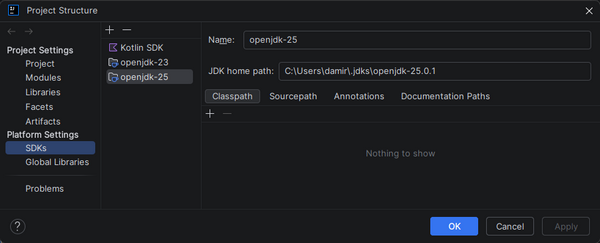
I decided to use JDK 25 by default, so I made the following changes to my user environment variables:
- I set
JAVA_HOMEto the JDK path:C:\Users\damir\.jdks\openjdk-25.0.1. - I added the
binsubfolder inside it toPATH:C:\Users\damir\.jdks\openjdk-25.0.1\bin.
This was enough to get Java 25 working in a newly opened terminal:
➜ java -version
openjdk version "25.0.1" 2025-10-21
OpenJDK Runtime Environment (build 25.0.1+8-27)
OpenJDK 64-Bit Server VM (build 25.0.1+8-27, mixed mode, sharing)
For switching to a different JDK version, I first created a generic PowerShell script that sets the JAVA_HOME and PATH variables correctly for a JDK in a given folder:
param(
  [Parameter(Mandatory)]
  [string]$Path
)

$env:JAVA_HOME = $Path
$env:Path = $env:JAVA_HOME + "\bin;" + $env:Path;
Two details worth mentioning:
- The environment variables are only changed for the given session. This allows me to use a different JDK version in each session.
- Having the
binsubfolder added to the start of thePATHcauses the files from this folder to be preferred over the ones from the default JDK, which is listed later in the path.
For convenience, I added the following two functions to my $PROFILE file:
Function Set-Jdk25
{
    Set-Jdk "C:\Users\damir\.jdks\openjdk-25.0.1"
}

Function Set-Jdk23
{
    Set-Jdk "C:\Users\damir\.jdks\openjdk-23.0.1"
}
Now I can use them to switch to a different JDK in the current session:
➜ Set-Jdk23
➜ java -version
openjdk version "23.0.1" 2024-10-15
OpenJDK Runtime Environment (build 23.0.1+11-39)
OpenJDK 64-Bit Server VM (build 23.0.1+11-39, mixed mode, sharing)
When I change the JDKs installed through IntelliJ IDEA, I only need to update the functions in my $PROFILE to match the set of installed JDKs and their paths. If I want to change the default JDK as well, I also need to update the JAVA_HOME and PATH environments accordingly.
