My Bitwarden backup script
Inspired by a great post in Bitwarden Community Forums and the author's bash script I decided to create my own PowerShell script for backing up the contents of my Bitwarden vault to my existing restic backup.
The backup script relies on the Bitwarden CLI. I installed it using Chocolatey:
choco install bitwarden-cli
Unlike the original script, I wanted to run my on a schedule and non-interactively. I stored my credentials in a separate script file that's only accessible with elevated privileges as described in a previous blog post:
$env:BW_CLIENTID = "client_id"
$env:BW_CLIENTSECRET = "client_secret"
$env:BW_PASSWORD = "password"
The BW_PASSWORD environment variable contains my Bitwarden password. The values for BW_CLIENTID and BW_CLIENTSECRET can be accessed from the Security Settings page of Bitwarden web interface:
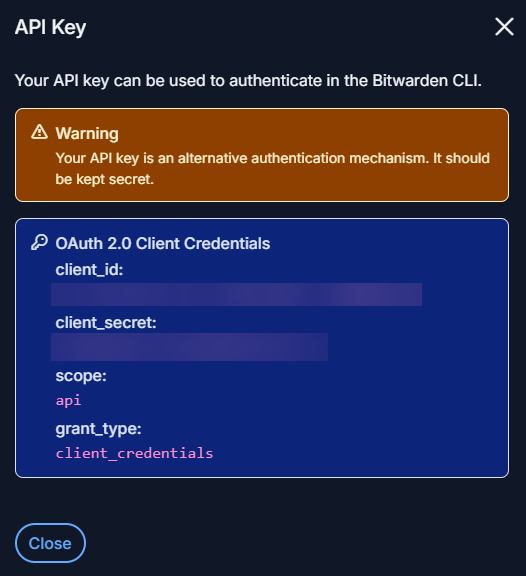
My backup script starts by invoking the script with my credentials, which stores them in the documented environment variables. I then log in using the API key and unlock the vault using the password from the specified environment variable. I store the returned session key into another environment variable:
bw login --apikey
$sessionKey = bw unlock --passwordenv BW_PASSWORD --raw
$env:BW_SESSION = $sessionKey
This is enough to make vault contents accessible through CLI commands.
I export the vault into an unencrypted JSON file since it's encrypted by restic anyway:
$backupFile = Join-Path $backupDir "export.json"
bw export --format json --output $backupFile
The JSON file doesn't include the attachments. Since I'm using them, I have to export those manually:
bw list items |
  ConvertFrom-Json |
  Where-Object { $_.attachments.Count -gt 0 } |
  ForEach-Object {
    $attachmentsDir = Join-Path $backupDir $_.id
    if (-not (Test-Path $attachmentsDir)) {
      New-Item -ItemType Directory -Path $attachmentsDir | Out-Null
    }
    foreach ($attachment in $_.attachments) {
      $attachmentFullPath = Join-Path $attachmentsDir $attachment.fileName
      bw get attachment $attachment.fileName --itemid $_.id --output $attachmentFullPath
    }
  }
To find the attachments, I list the items from the vault. I let PowerShell parse the returned JSON and then iterate through the items which have attachments. To be able to map those attachments back to the items, I store them in a separate directory for each item, using the item id as the directory name. After creating the directory, I iterate through the item attachments and download them keeping the attachment filename.
At the end of the script, I log out from the sessions to prevent any further access to the vault:
bw logout
The main restic backup script includes the $backupDir in the backup and deletes it afterwards to prevent further access to exported vault contents.
The backup gives me the peace of mind of having all the credentials securely stored and still available in the unlikely case that I couldn't access my Bitwarden vault anymore. Thanks to my restic backup policy, it also allows me to access any accidentally deleted items beyond the built-in vault trash functionality.
