A reason VS debugger might not hit breakpoints
There's an open source application plugin written in .NET I occasionally contribute to. As a regular part of my workflow, I sometimes have to attach the debugger to the application with the plugin loaded to troubleshoot unexpected behavior. When I did that the last time, the breakpoints in Visual Studio for some reason didn't work.
The breakpoint icons included a warning icon and when I hovered over them, the following message appeared in the tooltip:
The breakpoint will not currently be hit. No symbols have been loaded for this document.
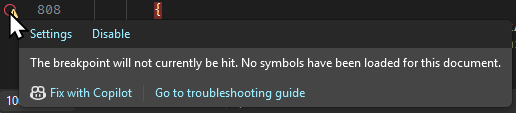
Usually this happens when no symbol (.pdb) file is available next to the plugin assembly (.dll) file or when it's out-of-date and it doesn't match the assembly. I followed my standard procedure for resolving such an issue:
- close the application,
- rebuild the plugin project,
- copy the new assembly and symbol file to application plugin folder,
- restart the application,
- and attach the debugger to its process again.
However, breakpoints still didn't work. They worked flawlessly the previous time I worked on the plugin, and I couldn't recall making any changes to my Visual Studio setup that would cause the issue.
I checked out the version of the plugin I worked on that time and repeated the whole rebuild and redeploy process. The breakpoints worked as expected. I tried it again with the latest version and the breakpoints stopped working.
The only explanation I could think of was that between the two versions of the plugin something has changed that broke the breakpoints (at least for me). Fortunately, there weren't too many changes and I quickly noticed one that looked like a potential culprit. The following line was added to the project (.csproj) file with one of the commits:
<PathMap>$(MSBuildProjectDirectory)=/_/</PathMap>
I wasn't familiar with that MSBuild property, so I looked it up in the documentation:
Specifies how to map physical paths to source path names output by the compiler. This property is equivalent to the
/pathmapswitch of the compilers.
This confirmed my suspicion: the property interferes with the source file paths in the symbol files. I tried removing the offending line: after a rebuild and redeploy, breakpoints worked again.
To see how exactly the property affects the symbol files, I opened both of them in a text editor and searched for a random .cs file reference in it:
- The symbol file built without the
PathMapproperty contained the absolute path to the source file on my disk:C:\Users\Damir\Git\PluginSln\PluginProj\SourceDir\SourceFile.cs. - The symbol file built with the
PathMapproperty had the absolute path to the solution directory replaced with/_/:/_/PluginProj/SourceDir/SourceFile.cs. Because of this change, the Visual Studio debugger failed to map the source files.
I'm not sure what the benefit of such PathMap setting is except if you plan to distribute the symbol files and don't want them to give away the absolute paths from the machine they were built on.
Since it's not my plugin project, I didn't want to commit my reversed change. Instead, I created a git stash with the PathMap change removed which I can apply whenever I work on the plugin and need to debug it. And I make sure not to commit the change when I contribute to the project.
